
Audacity for MAC
Free, open-source audio editor and recorder for podcasts, music and voice-overs.
Audacity Overview
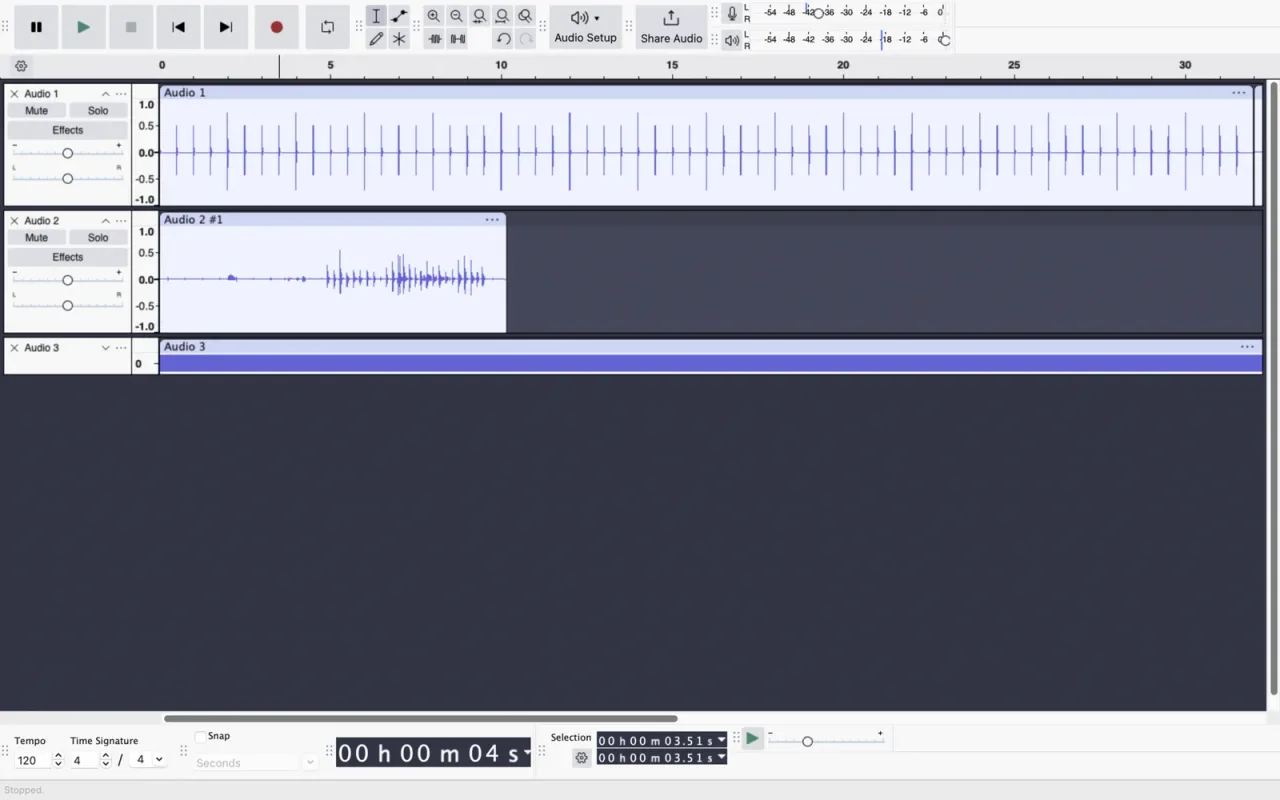
Audacity is a free, open-source audio editor and recorder for Mac, Windows and Linux. It records from a microphone or audio interface, edits several tracks at once, cleans up noise and exports to all the common audio formats, which makes it a favourite for podcasts, voice-overs, interviews, music and digitising old recordings. Audacity is made by the Audacity Team and released under the GPLv3 license, with no ads or paid features.
Audacity 4 brings an updated interface, workspaces and many productivity improvements. On the Mac you can choose a Universal download for both Apple Silicon and Intel Macs, or smaller downloads for one type of Mac.
Key Features
Audacity covers recording, editing and finishing audio in one app.
- Recording: record from microphones, audio interfaces and other inputs, with level meters and punch-in recording.
- Multi-track editing: cut, copy, paste, split and move clips across tracks, with unlimited undo.
- Effects: noise reduction, equalization, compression, normalization, reverb, pitch and tempo changes and many more, with real-time preview.
- Plugins: VST3, Audio Unit and Nyquist plugins add more effects and tools.
- Analysis: a spectrogram view to see frequencies, plus frequency analysis and Vamp analyzers.
- Labels: mark points and regions, then export each labelled region or each track to its own file.
- Import and export: WAV, AIFF, MP3, FLAC, Ogg and more, so it also works as an audio converter.
- Workspaces: arrange the interface for recording, editing or mixing, and switch between layouts.
What’s New in Version 4.0.1
Audacity 4.0.1 fixes problems found in Audacity 4.0 and adds a few features.
- Export multiple: export each track, or each labelled region, to its own file
- Restored missing Audacity 3 keyboard shortcuts
- Better keyboard navigation and screen reader support
- Fixed project corruption after a failed save, and problems converting .aup3 projects
- Fixed opening files and projects with non-English characters in their names
- Fixed VST3 settings being reset when playback starts
- A Liquid Glass app icon on macOS
Audacity FAQ
Is Audacity free for Mac?
Yes. Audacity is free and open source, released under the GPLv3 license. There are no ads or paid features.
Does Audacity run on Apple Silicon Macs?
Yes. The Universal download runs natively on Apple Silicon and Intel Macs. There are also separate downloads for Apple Silicon and for Intel Macs.
Which Audacity download should I choose for my Mac?
Choose the Universal download. The separate Apple Silicon (ARM64) download is smaller but has no plugin support, and on macOS 10.14 or earlier you need the Intel-only download.
Which macOS version does Audacity need?
Audacity 4.0.1 is tested on macOS 14 and 15 and may also work on older versions. The Universal download needs macOS 10.15 or later.
How do I record audio from my Mac with Audacity?
Choose your microphone or audio interface as the recording device, then press the red Record button. To record the sound your Mac plays, such as a video call, you need an extra audio routing app, because macOS does not offer it as an input.
How do I remove background noise in Audacity?
Select a few seconds of noise only, open the Noise Reduction effect and get the noise profile, then select the whole recording and apply Noise Reduction.
Can Audacity save files as MP3?
Yes. Audacity exports to MP3, WAV, AIFF, FLAC, Ogg and other formats, and it can export each track or labelled region to its own file.
Is Audacity safe to install on a Mac?
Yes, when you download it from the official website, audacityteam.org, which is where the download button on this page leads. Audacity is open source, and its code is public on GitHub.
How do I update Audacity on my Mac?
Audacity can check for updates and tell you when a new version is out. Download it from audacityteam.org and replace the old copy in your Applications folder.
Where does the Audacity download on audacity.FULLMAC.app come from?
The download button leads to Audacity's official Mac download page at https://www.audacityteam.org/download/mac/. audacity.FULLMAC.app does not change or repackage the installer.
Similar Apps
 SpotubeSpotube is a free, open-source music streaming app for Mac, Windows, Linux and Android. Instead of being tied to one service, it gets its music metadata, playlists and audio through plugins, made by its community or by you. It plays music natively, without being an Electron app, collects no telemetry or user data, and shows time-synced lyrics. Spotube is made by Kingkor Roy Tirtho and released under the BSD-4-Clause license.Music & Audio
- BlackHoleBlackHole is a free virtual audio driver for Mac that passes sound from one app to another. It appears in macOS as an extra audio device: send any app's output to BlackHole and pick BlackHole as the input in another app, and the audio flows between them with no added latency. That makes it possible to record your Mac's sound, play music or a DAW into a video call, or route audio between music apps. BlackHole is made by Existential Audio, and its source code is released under the GPL-3.0 license.Music & Audio
 LurarLurar is a menu bar equalizer for headphone listening. It takes the audio of every app on your Mac through Apple's Core Audio Process Tap, runs it through a 10-band parametric EQ tuned to your headphones, and plays the result on the output device or DAC you choose. Presets come from the AutoEq catalog, which you can browse and search by brand inside the app, and an editor lets you tune every band yourself with a live spectrum analyzer and a clip meter.Music & Audio
 Home RecHome Rec is a free, open-source app that records the audio your Mac is playing. It uses Apple's ScreenCaptureKit, so there are no virtual audio drivers, kernel extensions or routing to set up: launch it, click record, and it captures everything your Mac plays, a single app or a microphone. Recordings are saved as lossless WAV by default, or as FLAC or M4A, with a live waveform in the main window and in the menu bar.Music & Audio
 LyricGlowLyricGlow is a free, open-source Mac app that shows synchronized lyrics for the song playing in Spotify or Apple Music. Each word lights up as it is sung, karaoke-style, in a floating window that shows the previous, current and next line, and the current line also ticks by in the menu bar next to the clock, so you can follow the song with the window hidden. Every lyric line can show a live translation into any of 43 languages, including right-to-left scripts such as Persian, Arabic and Hebrew.Music & Audio
 Tiny PlayerTiny Player is a free, minimalist music player for the Mac with a native macOS interface. It plays MP3, FLAC, AAC, AIFF and WAV files, and since version 1.7.3 also Ogg and Opus on macOS 15 and newer. You drag your music onto it, build a playlist and find tracks with quick search, while a compact mode keeps the player small on your screen.Music & Audio
FULLMAC.app does not host this app. Download buttons lead to the developer’s own pages.